[2022-08-22]: VS Code extension fails to activate after installation
Date
2022-08-22 00:00 CEST
Summary
- VS Code extension failed to activate after installation.
- Why?
- It failed to get existing credentials from Secret Store.
- Why?
- Starting from version 1.69, VS Code changed the format of how they store credentials.
- Why?
- There was a bug in previous versions for Ubuntu and it seems like MacOS was affected too.
Authors
Stepan Maksymchuk
Impact
Only VS Code extension was affected.
Two people from the team reported this issue: Stepan and Mateusz.
Root Cause
The VS Code team changed the way of how they store credentials using Secret Store.
Trigger
Here are a vague steps to reproduce it (they were not verified in details):
- have a VS Code version 1.68 or lower
- install Archipelo extension
- sign in using your account
- update VS Code to the latest version (1.69 and higher)
- re-install Archipelo extension
- go to Archipelo extension's tab
- click "Sign in" -> nothing happens
- click the cog icon (settings) -> the error appears that the command is not found
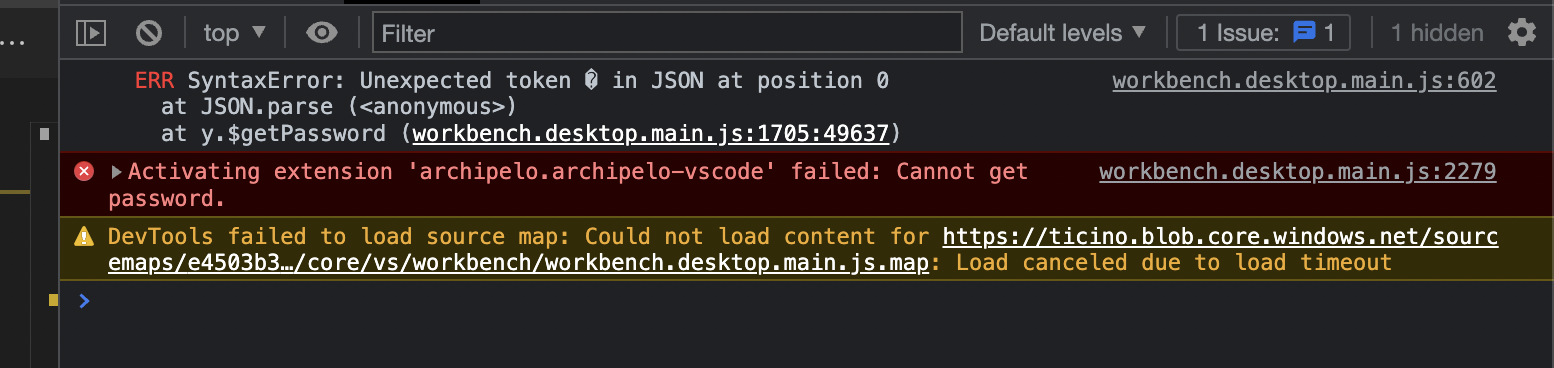
- if you open developer tools (Help -> Toggle developer tools) you will see errors like "cannot get password" there.
Detection
Mateusz reported this issue firstly during showcase. Stepan hit it during investigation of other issues.
Resolution
Here are manuals steps of how to resolve this issue on MacOS Monterey:
- Open
Keychain Accessand search forvscodearchipelo.archipelo - Delete
vscodearchipelo.archipelofrom your keychain
Here are links that helped to understand and find a manual fix for it:
Timeline
The timeline of the events related to the issue in form of the table:
| Time | Description |
|---|---|
| 2022-08-17 13:00:00 | The issue was reported by Mateusz |
| 2022-08-18 15:00:00 | The issue was hit by Stepan |
| 2022-08-19 10:00:00 | Investigation of the issue started |
| 2022-08-22 14:30:00 | Manual fix was found and tested by Stepan |
| 2022-08-22 15:00:00 | Manual fix was applied by Mateusz |
Action Items
The following issue was created for investigation: #4038 The following issue was created to handle this error in the code and not crash the extension if we hit it in the future: #4048
Lessons Learned
As we're working with VS Code API, we need to start pay attention to its releases too. However, I couldn't find any info about this fix in release notes of VS Code.